English
 繁體中文
繁體中文
A pattern keeps repeating with WooCommerce stores that add 3D configuration. The configurator works. Orders arrive. The specification does not. Somewhere between the model the shopper built and the line item sitting in the admin panel, the detail the workshop actually needs disappears — which finish, which left or right hinge, which glazing.
That gap is not a rendering failure, and most of the time it is not a bad plugin either. It is where WooCommerce's data model ends. What follows is a map of that boundary: what the platform handles on its own, the four places plugins stop, and what the other side of the line really involves.
What WooCommerce gives you before you install anything
WooCommerce has carried native 3D support since 2024, and it is reasonably honest about scope. A product can hold a .glb model, the block renders it on the product page, shoppers rotate and zoom, and on supported phones the same file drives AR. No plugin, no code.
That viewer is competent work. It is also not a configurator. Everyone sees the same model, in the same way everyone sees the same product photo. There is no option to recolour one component, hide a part, or refuse a combination your factory cannot build.
Which is why a WooCommerce 3D product configurator almost never starts from the platform's own 3D block. It starts from a plugin, and the plugin runs into a wall at a very predictable place.
One thing worth settling first: the model itself. Formats, mesh budgets, texture sizes — that groundwork is identical to any web 3D project, and we set it out in preparing CAD files for a web 3D configurator. Everything below assumes a model that loads on a phone in under two seconds. If yours does not, fix that before reading further, because no amount of logic rescues a heavy file.
The four places plugins stop
We have configured plugins on WooCommerce, and we also run a WooCommerce store of our own for a safety-helmet brand. So the limits below are not summaries of other people's complaints. They surface in this order, roughly.
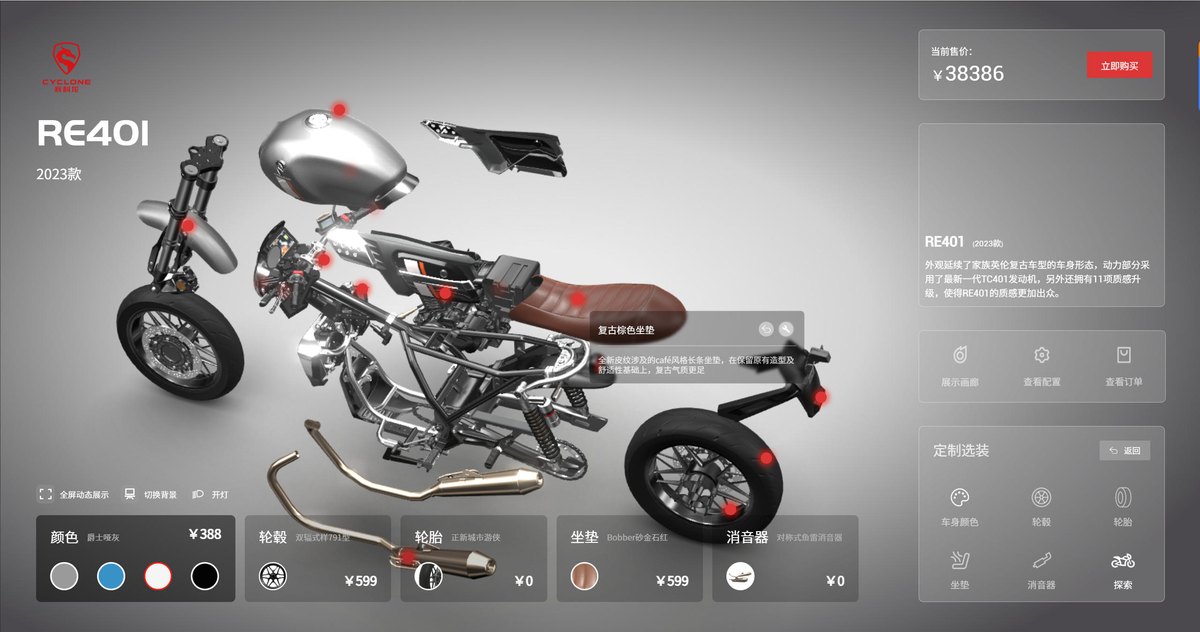
Before the walls, it is worth seeing what the far end of the spectrum looks like. A component-level configurator gives every part its own option set, its own material annotation and its own price, and the total recalculates while the shopper is still choosing. That is the picture to hold onto, because the four walls below are precisely where a WooCommerce plugin stops following it.
1. The variation table explodes
The first wall is arithmetic. WooCommerce variations are SKU-level records. Three attributes with ten values each produces 1,000 rows. Somewhere in the low hundreds the admin screen starts timing out on save, product updates crawl, and the database grows in a way nobody planned for.
We ran into this on a cabinet project where the option set looked modest on paper: 40 door fronts, 12 worktops, 6 handle sets. One save operation in the WooCommerce admin created 2,880 variations, and the next save timed out. The workshop, for its part, kept 58 parts in stock. We had written thousands of rows that represented nothing the factory would ever build, and the product screen had become unusable somewhere along the way.
2. The price does not follow the configuration
WooCommerce builds a line total from the variation's stored price. If your price is a formula — length times width times a rate, plus a finish surcharge, minus a quantity break — that number is neither a variation price nor a static field.
There is a hook for this. woocommerce_before_calculate_totals fires on every cart recalculation, and the price object can be overwritten inside it. Most plugins do not use it. They compute once at add-to-cart, which produces a specific and quietly expensive symptom: the shopper edits the configuration in the cart, and the price stays where it was.
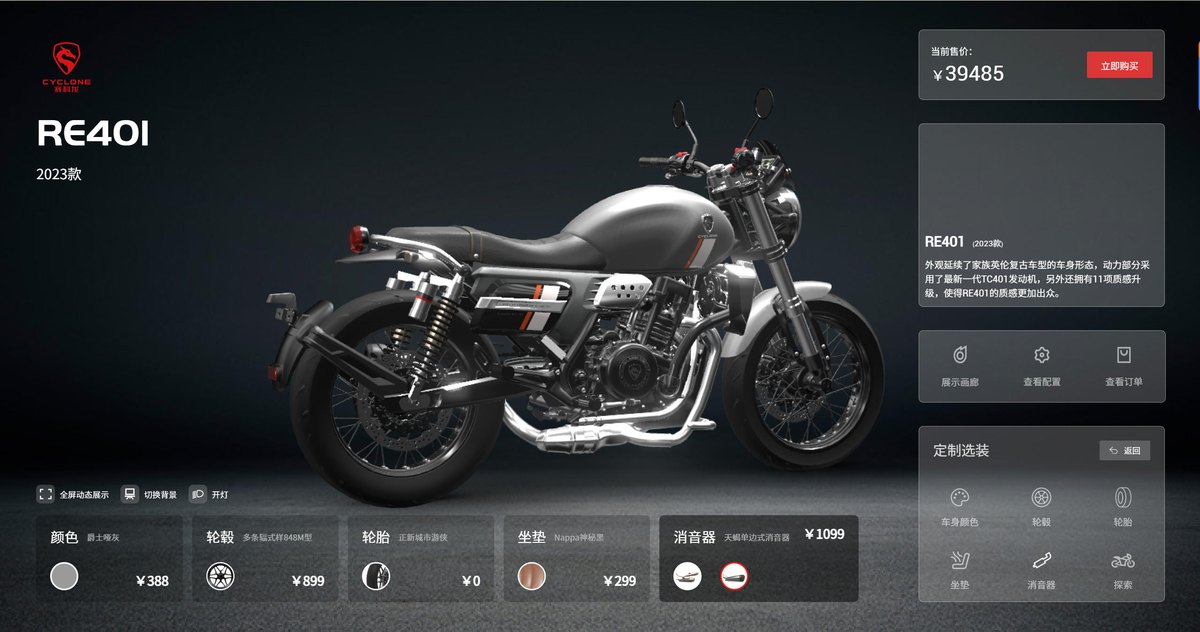
Done properly, the price layer looks like this: every component carries its own price, and the total moves the moment the selection changes.
3. The order cannot hold the specification
This one surfaces as a factory problem rather than a website problem. On a client project the production team spent about a month retyping specifications out of printed order emails before anyone mentioned it, because the strings in item meta were readable enough to look correct and irregular enough that no export could parse them. WooCommerce will hold two or three simple selections in item meta without complaint. A full configuration object is a different matter, and the ceiling is less technical than it is a question of what shape the plugin decided to write.
Two consequences follow. The admin order screen shows something a human can read and a machine cannot parse. And every order export to production needs a hand-built mapping per product line. On one project we rebuilt that mapping three times, because the custom product builder for WooCommerce kept growing and the string format kept changing underneath it.
4. The .glb file will not upload
WordPress refuses .glb on upload. The type is not in the allowed MIME list, and this is not a checkbox in settings — it is a filter on upload_mimes mapping glb to model/gltf-binary. Twenty seconds of work once you know it exists, and a genuinely baffling hour if you do not. Media library errors give you no hint that the file type is the reason.

What the shopper sees when it breaks
The four failures above reach the surface as a short list of complaints, and every one of them sounds like user error until you trace it back.
"I changed the colour and the price didn't move." That one is the price hook, or rather its absence. Nothing about the shopper's understanding is at fault; the page simply failed to recalculate.
"The picture in my cart is the wrong colour." WooCommerce pulls the line item thumbnail from the product or the variation. A colour that only exists inside the configurator has no image attached to it, so the cart quietly falls back to the default. Fixing this properly means generating a thumbnail per configuration — either pre-rendered per option set, or rendered on the fly from the same scene the configurator uses. That is a real piece of work, not a setting, and it is the single most requested fix we get after launch.
"I ordered the oak top and the confirmation says walnut." This one costs money rather than annoyance. It comes from readable strings sitting in item meta that a human then re-types into a production system.
"I configured it yesterday and it's gone." Configuration state held in the session does not survive a session expiry, a switch from phone to laptop, or a cart merge after login. Twenty minutes of configuration evaporating is enough to lose the sale outright. Expensive products are the ones that take longest to configure, which is an unfortunate pairing. State has to live in the cart item, written on every change, not in the session.
None of it is on a plugin's feature list, and that is not really a complaint about feature lists. Seams between two systems are rarely features. Closing them is simply what a custom build gets paid for.
A test you can run in an afternoon
Before comparing vendors, run this. It takes about forty minutes and it puts you on one side of the line or the other.
- Write down every combination your workshop refuses to make.
- Write down every price that depends on a calculation rather than a lookup.
- Write down what the factory needs on an order line before anyone can start work.
If the first list is empty and the second is short, a plugin is genuinely the right answer, and the money is better spent on model quality. If the third list runs past three fields, you are already past the ceiling — that data has to be structured at the source, and no WooCommerce product configurator plugin will structure it for you. Structuring it afterwards means rebuilding the integration, not extending it.
What the other side actually involves
Custom on WooCommerce is two integrations, not one, and quotes usually present them as a single job.
Product side. The configurator replaces the variation selector. The product becomes one configurable product, option state lives in the browser until add-to-cart, and the rules run client-side so the interaction stays instant. This is the visible half and the easier half.
Commerce side. On add-to-cart you write the configuration as structured item meta, recompute the price server-side from the same rule set the browser used, and make both survive cart updates, order creation and refunds. This is where estimates go wrong, because it touches checkout, and checkout is the one thing you cannot afford to break on a live store.
The rule layer between the two is the part that outlives everything else. Options, dependencies, price formulas, the constraints your production line actually enforces — that logic has a longer life than the storefront does, and we wrote about it separately in how a product configurator rules engine works. If you are building anything past a demo, read that before shortlisting vendors. The rule model is the piece you cannot swap later without starting over.
In practice the split is roughly a third product side, half commerce side, and the remainder in testing across devices and browsers. Anyone quoting you a timeline where the 3D work dominates has probably not looked at the checkout. The 3D is the part everybody can see and nobody argues about. The order handoff is where projects slip.
If your catalog is furniture-adjacent, the buying criteria overlap heavily with choosing furniture configurator software, which goes deeper on the vendor side than this piece does.
The mobile half nobody budgets for
B2B WooCommerce stores skew desktop, which is why weight gets ignored until after launch. But the configurator is usually opened on a phone — at a trade show, on a factory floor, in a showroom where the wifi is worse than the sales deck assumed.
Our own store's homepage carried a 3D demo at 1.84 MB of transfer. It looked fine over an office connection and stalled on a phone with two bars. Most of that weight was not geometry. It was a 424 KB development build of a JavaScript library sitting where a 108 KB minified build belonged — a ten-minute fix that removed roughly a third of the page.
The budget I would hand any WooCommerce store: 2 MB for the initial 3D payload. If the first frame needs more, load in two stages, a low-detail pass first and textures behind it. A shopper on a phone forgives a soft model that appears in one second. They will not wait nine seconds for a sharp one. The mobile interaction detail is in mobile 3D product interaction if you want the specifics.
Three things to test before launch
These do not show up in a demo and do not show up in staging either, which is why they reach production.
Page caching. WooCommerce stores usually run full-page caching, object caching or a CDN. If a configuration can be encoded in a URL parameter — many can, because sharing a build by link is a feature shoppers expect — you now have a cached page per configuration, and the next visitor may be served someone else's build. Either the configurator state stays out of the URL, or the cache rules have to exclude it deliberately.
Account switching. Shoppers log in halfway through a session, or a B2B buyer logs in after building a configuration as a guest. Whatever the merge logic does with the cart, it has to do something sensible with the configuration attached to those cart items.
Refunds and edits. When an order is edited or refunded, does the configuration data go with it, or does it linger in a table nobody maintains? On a store with real volume this becomes a reporting problem within a year.
None of the three is exotic. All three are the kind of thing that only surfaces once someone with real traffic uses the thing, which is exactly the moment you least want to be debugging.
Where to draw the line
| Signal | Plugin is fine | Go custom |
|---|---|---|
| Combinations | Independent options, under a few hundred | Dependent rules, thousands of valid builds |
| Pricing | Fixed surcharges per option | Formula-based, quantity breaks, per-dealer terms |
| What the order carries | Two or three readable attributes | Structured spec the ERP or workshop consumes |
| Output | Add to cart | Quote request, BOM, production file |
| Who owns the rules | Whoever built the plugin | You, editable without a developer |
The honest middle is where most growing catalogs sit: a plugin for the products that genuinely are simple, and one custom build for the line that brings in the revenue. That split is more common than either pure answer, and there is nothing untidy about ending up there.
Whatever you choose, the next step is the same one in the list above. Write down every combination your workshop refuses to make. If it fits on one page, install a plugin and spend the budget on models. If it does not, talk to us and we will go through the rules with you before anyone quotes a number.
FAQ
Q: Does WooCommerce support 3D product models without a plugin?
Yes. WooCommerce has carried native 3D since 2024 — a product can hold a .glb file and the standard block renders it on the product page, including AR on supported phones. What it does not do is configuration: every shopper sees the same model, with no component-level options and no combination rules. A viewer and a configurator are different products.
Q: Why does my 3D model fail to upload to the WordPress media library?
Because .glb is not in WordPress's allowed MIME list by default. It is fixed with a filter on upload_mimes that maps glb to model/gltf-binary. The media library error message does not mention file type, which is why this costs people an hour instead of a minute.
Q: Can I add a configurator to WooCommerce without writing code?
To a point. Plugins let you set colours, materials and sizes on a product page with no code, typically from free to around $150 a month depending on product count and logic depth. What they generally do not cover is dependency rules between options, formula pricing, and structured configuration data reaching the order — those are where custom development starts.
Q: How do I stop variation counts from exploding?
Stop modelling configurations as variations. Treat the product as one configurable item and keep option state in the configurator, writing only the final selection into the order as structured item meta. Variations are SKU records for inventory and shipping; they were never intended to represent every shopper-visible combination.
Q: What happens to the configuration when a customer edits the cart?
Nothing good, by default. Most plugins compute price once at add-to-cart, so editing the configuration afterwards leaves the old price in place. Fixing it means hooking woocommerce_before_calculate_totals and recomputing from the stored configuration on every cart recalculation. Test it explicitly before launch — it is the most common silent pricing bug in this stack.