English
 繁体中文
繁体中文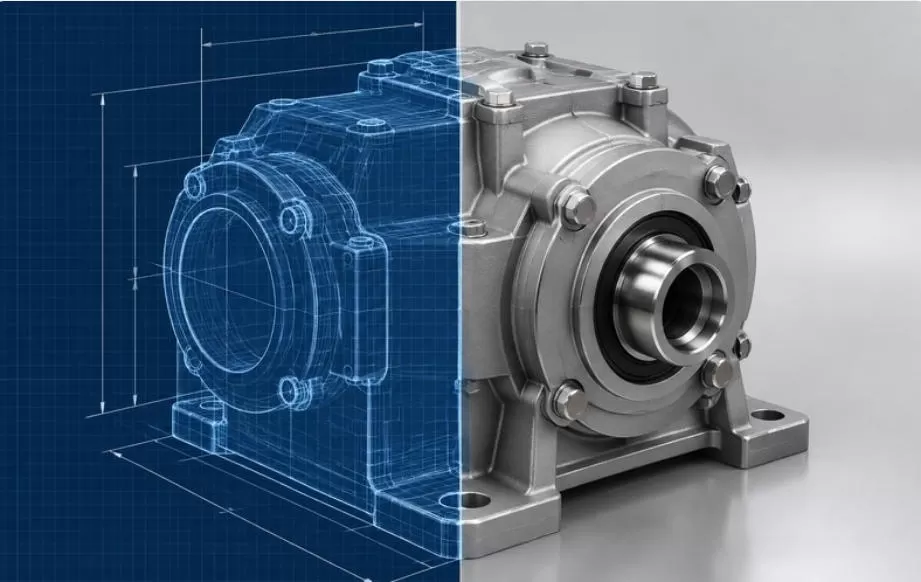
Most configurator projects that run late do not run late because of the software. They run late because of the models. Industry experience from teams that have processed hundreds of CAD assemblies puts asset preparation at 4 to 12 weeks for a mid-size catalog, and unlike development it scales with SKU count rather than feature count, which means teams that estimate the software and assume the models will take care of themselves get ambushed, every time. This article is the checklist we wish every client read before sending their first file.
Why the STEP file cannot ship as-is
CAD software such as SolidWorks, Creo or CATIA stores geometry as precise mathematical surfaces, which is exactly what manufacturing needs and exactly what a browser cannot draw. The browser renders triangles, so the conversion starts by tessellating those surfaces into a mesh, and a production assembly at full precision can produce millions of triangles for a single product.
The problems do not stop at density. Assemblies contain screws, boards, cables and mechanisms that will never be visible on a product page but will be loaded anyway. CAD colors are not materials, so a plastic that looks blue in the viewer renders as flat unshaded color in 3D unless someone authors a physically based material for it. And there are no texture coordinates in a CAD export, which means no labels, no wood grain, no brushed metal anisotropy until a human unwraps the model. None of this is a defect in your CAD. The two formats simply serve different masters.
The pipeline your files will go through
Knowing the stages tells you what to prepare and what to expect on the invoice. The industry-standard path runs eight steps:
Stage | What happens |
1. Export | STEP or native format, ideally external parts only |
2. Tessellate | Surfaces become a triangle mesh |
3. Clean | Internal parts removed, parts merged and renamed |
4. Decimate | Triangle count cut, often from millions to under 100k |
5. UV unwrap | Texture coordinates added, done by hand |
6. PBR materials | Real-world finishes authored to match the product |
7. LODs | Two or three detail levels for near and far viewing |
8. Compress | Draco and KTX2 compression, export as GLB |
Stages 5 and 6 are the human bottleneck, and they are where schedules slip. Compression is what makes the result usable: Draco alone typically removes 60 to 90 percent of the mesh buffer, and with texture recompression the overall file commonly drops 70 to 90 percent. The published extremes are dramatic, with one documented industrial assembly going from a 221MB STEP file to 9.4MB with hierarchy intact, and 1.3MB once the invisible internals were stripped. For modular machines and production equipment, where industrial equipment configurators depend on exactly this kind of prepared assembly, the pipeline is identical from raw STEP to browser-ready GLB.
The pre-flight checklist for the engineering team
This is the part that prevents rework, because most of it is decisions only your side can make.
Export the outside, not the inside. A marketing or sales configurator needs the external shell. Internal mechanisms, tolerances and manufacturing notes should stay out of the file entirely, both for file size and for intellectual property. Ask engineering to export external parts only, and put an NDA plus a source-file deletion clause in the vendor contract before anything is transmitted.
Fix units, orientation and naming at the source. Assemblies arrive at conversion vendors with mixed units, parts facing random directions and names like M6_x40_flange_v3_final2. Every one of those gets fixed eventually, and fixing them at the source costs minutes while fixing them downstream costs days.
Separate what varies from what does not. If the configurator will swap colors, materials or components, the parts that change must be separate objects in the assembly, not merged into one body. A single fused body means rebuilding the model structure later, which is the most common and most avoidable rework we see.
Bring appearance references. Photographs of the actual finishes, taken in daylight, do more for realism than any material library. A configurator that renders the wrong anodized aluminum undermines trust in the exact way product photography cannot recover from.
Flag the moving or configurable relationships. Which parts slide, hinge, attach or exclude each other is knowledge that lives in your engineers' heads. Writing it down before the rules engine gets built prevents the worst kind of rework, the kind that changes the model structure rather than the files. Our services page describes what we ask for at handover, and the list above covers most of it.
Acceptance criteria worth writing into the contract
Vague acceptance produces vague results. Numbers hold everyone honest. A reasonable bar for a web configurator model today: final GLB in the low single-digit megabytes per product, first meaningful load under 2.5 seconds on a mid-range phone, two to three LODs included, materials matched against your reference photographs, and configuration-relevant parts as separately addressable objects. Conversion working from CAD typically costs 30 to 50 percent less than modeling from photographs, but that saving evaporates if the acceptance criteria are loose enough to require a second pass.
One structural warning: if a vendor quotes you a timeline without asking how many SKUs you have and what state your CAD is in, the timeline is decorative. Asset preparation is the critical path, and its length is knowable on day one from your answers alone.
The rework causes we see most often
A short catalog of the failures, since they repeat across projects with almost mechanical consistency.
The fused body problem leads the list. Engineers merge components into a single solid for convenience during design, and the configurator then cannot swap a finish or detach a module without remodeling the part structure. Undoing a merged body costs more than building the assembly correctly the first time, which is why the separation question belongs in your checklist rather than in the vendor's discovery call.
Tessellation set too fine or too coarse comes next. Export dialogs ask for a chord tolerance, and the default value is rarely the right one for a web deliverable, so teams either ship meshes too dense to decimate cleanly or so coarse that curved edges read as polygons on screen. One test render at the intended quality settles the tolerance before the whole catalog goes through the pipeline.
Scale and orientation errors sound trivial and are not. A model that arrives 100 times too large or rotated onto its back breaks downstream automation silently, and the error often surfaces in the rules engine or the AR preview days later, far from its cause.
The last common one is variant-per-file thinking, where the team exports one complete assembly for every color or configuration combination. A product with forty finishes becomes forty nearly identical assemblies, and the pipeline work multiplies by forty for no benefit. The configurator needs one well-partitioned model plus a list of which parts change, nothing more.
When CAD conversion is not the shortcut
The honest caveat. CAD is the cheapest starting point when the geometry is current and the appearance matters more than the organic detail. It is the wrong starting point for products with complex textile or organic surfaces that CAD never captured well, for legacy files where the drawing no longer matches the product as shipped, and for appearance-heavy goods where a 3D artist working from photographs will match reality faster than an engineer's drawing will. If your product changed since the CAD was last revised, decide which source is the truth before anyone converts anything.
If you want a read on your specific files, send us a sample assembly and we will tell you what the conversion would involve and where your checklist gaps are.
FAQ
What format should we export from our CAD system?
STEP is the sensible neutral choice for most pipelines, exported with external parts only. Native formats such as SolidWorks or Creo files also work and preserve hierarchy, but confirm the vendor supports your specific CAD version before exporting anything.
How small should the final 3D file be?
Aim for a GLB in the low single-digit megabytes per product, which Draco and KTX2 compression routinely achieves from production CAD. The practical test is a first meaningful load under 2.5 seconds on a mid-range phone.
Will sending CAD files expose our designs?
Only if you send everything. Strip internal mechanisms and manufacturing data before export, share the external shell, sign an NDA, and agree in writing that source files are deleted or returned after the project.
How long does asset preparation take?
For a mid-size catalog, 4 to 12 weeks, and it scales with SKU count rather than feature count. Start it in parallel with feature specification, because it is the critical path of the project.