English
 繁體中文
繁體中文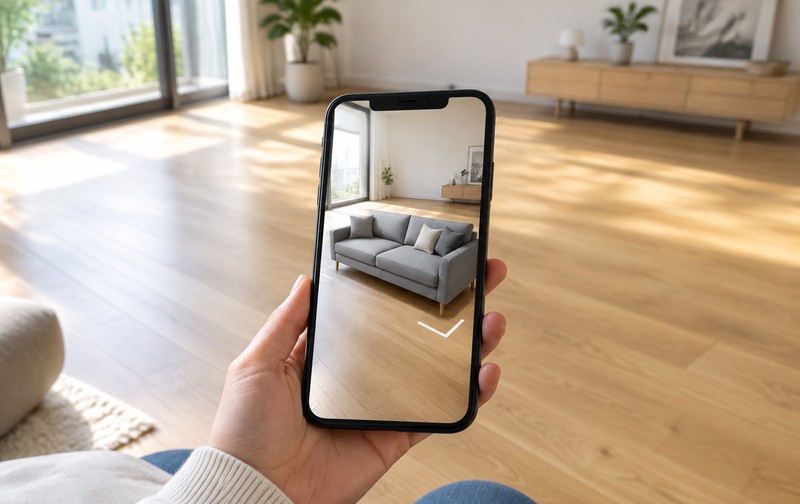
A shopper taps "View in your room" on a product page, sweeps the phone across the living room, and a sofa settles against the wall at what looks like true scale. It's a nice demo. Whether it deserves a line in your budget is a different question, and the answer has almost nothing to do with how good the demo looks.
Two numbers frame the decision. The first is 80%: shoppers overwhelmingly refuse to install an app just to try a piece of furniture in their room, which is why app-based AR never broke out of novelty status. The second is 1–5MB, the file size each AR-ready 3D model has to stay under if you want the thing to launch in seconds rather than minutes. Neither number is about technology. Both are about friction and asset discipline, which is where these projects actually get won or lost.
What the button actually does
WebAR runs in the phone's browser. No app store, no install, no account. On iPhone, Safari hands off to AR Quick Look; on Android, Chrome opens Scene Viewer. The camera detects a horizontal surface, the model anchors to it, and lighting from the room gets estimated well enough that shadows don't look pasted on. Device coverage sits around 90% of modern phones, and the part that matters commercially is the missing step: nothing gets downloaded from an app store before the shopper sees your product in their space.
Mechanically, that button is the last link in an asset pipeline. Somebody has to author or convert a 3D model, strip it down to a mobile-friendly polygon budget, bake materials into a compressed format, host it on a CDN, and write the fallback for the 10% of browsers that can't do AR at all. When brands say AR "didn't work," they usually mean one of those steps was skipped.
The numbers, and how much to trust them
Agency write-ups consistently report engagement lifts around 30% on AR-enabled pages and return-rate reductions in the 20–40% range for furniture and home categories. One implementation studio publishes a mobile conversion lift near 15%. Implementation budgets land somewhere between $5,000 and $25,000 depending on product count and platform integration, with payback claimed inside three to six months.
Treat every one of those figures as a marketing number until you've run your own test. They're directionally useful, since AR does seem to move returns in categories where scale and fit are the uncertainty. The conversion lift itself depends on your baseline, your traffic mix, and whether shoppers on your site have the patience for it. A brand returning 30% of orders because couches arrive damaged will not fix that with a camera. The lift percentages also tend to come from vendors who selected their best-performing clients for the case study, which is standard practice and worth remembering.
What you can verify before spending anything: your return reasons. If "looked different than expected" and "wrong size for the space" dominate your return log, AR is aimed at the right problem. If returns come from shipping damage, color mismatch under indoor lighting, or buyer's remorse, the camera won't help.
Where the cost comes back
The product has to be big enough that a phone screen can't convey it. Sofas, dining tables, wardrobes, outdoor furniture, tile and flooring samples, appliances judged against a countertop. In those categories the buyer's real question is spatial: will it fit, will it crowd the window, does the walnut read warm or gray against my floor. A 3D model dropped into their actual room answers that in a way no studio photo can.
B2B buyers benefit too, quietly. Dealers and specifiers who can't visit a showroom can place an equipment footprint on their factory floor or a fixture in a client's lobby. That's less photogenic than consumer AR and arguably more valuable, because the alternative is a wrong order measured in pallets.
For brands already selling customized furniture, the combination is stronger than either piece alone: configure the piece, then place that exact configuration in the room. We build custom furniture configurators on the same 3D master model that feeds this kind of AR view, which is why the pipeline cost gets shared rather than doubled.
Where it doesn't
Small objects don't need it. A watch, a lamp, a phone case: the shopper can judge those from a good render, and AR adds a step without adding information.
Products whose value lives in texture are risky. Phone cameras and compressed materials soften weave, grain, and metallic flake, and a luxury fabric that looks extraordinary in a hero shot can look flat when a compressed model is floating in someone's kitchen. You are showing less fidelity than a render, in a context the shopper controls. That trade can backfire.
Catalogs without 3D data are a trap. If 80% of your SKUs exist only as photography, AR becomes a project per product, and the coverage never feels complete enough to justify the button. Either commit to a modeling pipeline across the range or accept that AR lives on a handful of hero items.
And then there's the category of returns AR can't touch. Fit on apparel, damage in transit, buyer's remorse, wrong expectations set by a bad product description. Fixing those is a different project.
The pipeline is the project
This is the least glamorous section and the one that decides whether the launch holds up. Each AR model wants to sit near 1–5MB. That means decimating CAD or high-poly source geometry, authoring materials for real-time rendering rather than offline ray tracing, and testing the result on a mid-range Android phone rather than the studio's latest iPhone. The conversion work overlaps heavily with what a web configurator needs, and the checklist we published for preparing CAD files for a web 3D configurator applies almost line for line.
Page performance is the other half. An AR button that pulls a heavy loader script into your product page can push largest contentful paint past the 2.5-second mark on mobile, and that penalty lands on every visitor, including the majority who never tap the button. Load AR assets lazily, on interaction, and measure the page with and without it.
Then plan the fallback. Roughly one in ten devices can't do AR, and older Android browsers are the usual suspects. The honest solution is a 360° sequence or a static 3D viewer on those devices, which is the same trade-off we walked through in 360° spin vs 3D configurator. Two viewers cost more to maintain than one, and pretending the gap doesn't exist costs you the sale.
If you already have a configurator
The strongest version of AR is not a button next to a gallery. It's the end of a configuration session: the shopper picks the fabric, the leg finish, the size, then places that exact build in the room. Doing it properly means the AR model has to inherit configuration state, which is a plumbing problem more than a rendering one. The rule layer that decides which combinations are valid is covered in product configurator rules engine. AR sits downstream of that layer, and most implementations that fail here fail because the configurator and the AR viewer live in different systems.
Mobile interaction design adds another constraint. Thumbs, one-handed use, and short attention spans shrink the amount of UI you can put on an AR screen. Our notes on mobile 3D product interaction cover how much gets lost when a desktop configurator gets squeezed onto a phone, and AR takes that squeeze further.
A decision you can make this week
Pull three months of return reasons. Count how many trace back to scale, fit, or "expected something else." Now look at your top twenty SKUs by revenue and ask, honestly, whether you own usable 3D models for them. If both answers point the same direction, with spatial confusion driving returns and models already in hand, AR is worth a pilot on those twenty products with a lazy-loaded viewer and a proper fallback. If either answer is thin, spend the budget on the model pipeline first. It's the prerequisite for AR, for a configurator, and for the renders your catalog needs anyway.
Piloting on a defined SKU set is also how you get your own numbers instead of a vendor's case study. Start there, measure the return reasons again in ninety days, and decide whether to roll it wider. If you want a second opinion on whether your catalog is ready for it, send us the product list and return data and we'll say what we'd do — including when the answer is not yet.
FAQ
Q: How much does WebAR product visualization cost?
Implementation budgets typically range from $5,000 to $25,000 depending on how many products get 3D models, whether AR connects to a configurator, and which e-commerce platform you run. The modeling work usually dominates the bill, not the AR viewer itself.
Q: Does WebAR work on all phones?
Roughly 90% of modern smartphones support it. iPhone uses AR Quick Look in Safari, Android uses Scene Viewer in Chrome. Older Android browsers are the main gap, so a 360° viewer fallback is part of a serious implementation, not an afterthought.
Q: How fast does a WebAR model need to load?
Aim for two to five seconds from tap to placement. That generally means a glTF or GLB file between 1MB and 5MB per product, delivered from a CDN, with the AR script loaded only when the shopper taps the button.
Q: Can AR show the product a customer configured?
Yes, and that's the strongest use of it. The viewer needs to inherit the configuration state (fabric, finish, size) from your configurator. Brands that treat AR as a separate model from the configurator end up with two inconsistent versions of the same product.