English
 繁體中文
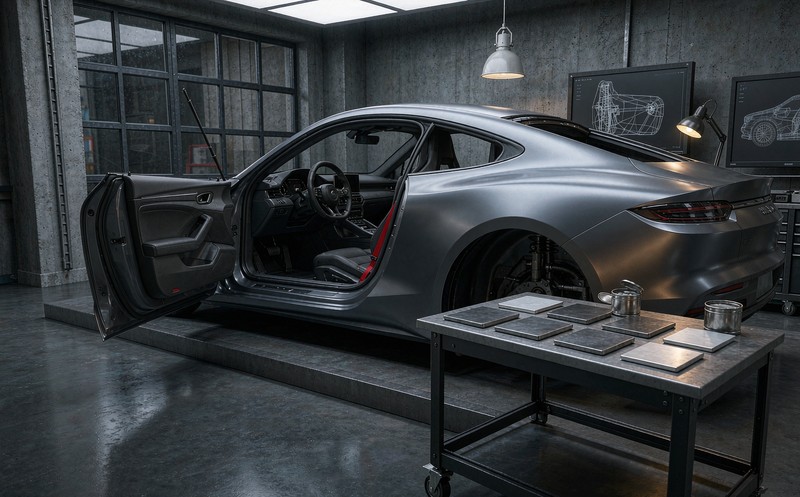
Every car configurator demo starts with paint. You tap a swatch, the body changes, someone in the room says "nice" and the meeting moves on. It is the easiest thing to show and the least useful thing to get right. A web 3D car configurator pays for itself somewhere else entirely, and buyers notice the difference long before they can name it.
Here is the version of that meeting that goes wrong. The buyer picks a matte white, signs, and the car arrives looking flatter than the screen suggested. Nobody lied. The render simply had no environment to reflect, and matte finishes are almost entirely a story about what they reflect.
Paint is a lighting problem first
A car body is a mirror with a colour coat on it. Change the room, change the car.
Studio grey, showroom warm white, overcast daylight, late afternoon sun with a low angle: those four conditions turn one paint code into four different impressions of the same vehicle. A car color configurator that shows a single lighting setup is showing you one of those four and implying it is all of them.
Two things follow, and neither is expensive.
The viewer needs at least a neutral studio environment and a daylight environment, switchable, with the background changing alongside the light. A car on a grey field lit like a photo studio reads as a product shot. The same car on asphalt under a sky reads as a car. Buyers are deciding which one they are buying.
The paint library should also carry a reference rather than a poetic name. "Storm Grey" tells a customer nothing when the physical sample in the dealership is a different grey. Manufacturer colour codes, or a documented sample that the 3D material was calibrated against, settle it. This is the sort of detail that looks like housekeeping until a customer parks next to another one of your cars.
A door is a state, not an option
A door that swings open is where most automotive 3D work quietly falls apart. The closed-body model suddenly needs three things nobody budgets for on the first pass: an interior, a hinge that behaves, and a limit.
The interior matters because an open door is a window into the cabin. If the model was built as a shell with a painted interior card, opening the door reveals the trick instantly. Seats, dashboard, door trim, sill plates, the carpet edge, all of it has to exist at a fidelity that survives close inspection, because the camera is now inside the car.
Hinges have a geometry problem. Real doors do not rotate about a clean vertical axis at the skin; they swing on a hinge buried in the A-pillar or B-pillar, with a check strap that stops them at two or three positions. Getting that pivot wrong produces the tell-tale artefact of 3D car work: a door that intersects the front wing at forty degrees or floats a centimetre off the body at the shut line.
The limit is a design decision, not a technical one. Most production cars open to about seventy degrees. Showing ninety because the model allows it is the kind of thing a dealer notices in the first thirty seconds.
Wheels are fitment wearing a styling costume
Wheel selection looks like the most decorative part of the whole experience and is the most constrained.
A wheel is defined by diameter, width, offset, bolt pattern and centre bore. The configurator only needs to expose the first two to a customer, but the other three decide whether the part exists for that vehicle. When the option list is generated from trim rather than from a flat catalogue, the bad combinations never appear. That is a rule-layer job, and the mechanics of it are the same ones described in product configurator rules engine for other categories.
The visual knock-on is worse. Going up two inches of diameter with the same overall rolling radius means a shorter sidewall, which changes how much of the arch the tyre fills after lowering, which changes whether the brake caliper is visible. A vehicle accessory configurator that swaps the wheel mesh and leaves the ride height, arch gap and caliper position untouched produces a car that no one has ever seen on a road.
The interior is judged under a different light
Cabin materials are usually where a 3D build spends its last unplanned month. Leather, alcantara, open-pore wood and piano black all behave badly under a single hard key light, and all of them are supposed to be judged by someone sitting inside.
Ambient lighting makes it worse in a useful way. Modern cars have configurable interior lighting, which means the trim and the light are coupled options. A warm amber strip across a tan dashboard is a different interior from the same strip in cool white, and both are legitimate builds.
What the handover should contain, and what most of them do
The list is short and boring, which is why it gets skipped.
A colour reference per paint, tied to something physical. A state list for every moving part, with the angle limits written down. The option table as data rather than as screenshots, so the dealership system and the configurator agree on what exists. And a rule set that lives somewhere editable, because model years change and the person who built the configurator will not be the person maintaining it in year three.
We built one of these for a Toyota SUPRA project: exterior paint, door and boot states, dimension display, running on both desktop and phone. The part that took the calendar was not the paint library. It was the door states and the dimension overlay, because both of them force a conversation with the people who actually know the car.
Those states are also where an AR layer becomes plausible. Placing a car in a driveway is a novelty until the buyer can open the door and see the cabin, which is why the format questions in WebAR product visualization tend to land in the same meeting as the configurator scope.
Why this matters commercially
A car is a considered purchase with a long gap between interest and test drive. Everything the buyer can resolve on screen is a question they do not bring to a dealership, and every question they do bring costs a salesperson twenty minutes. That arithmetic is the whole case for an online vehicle configurator, and it explains why the four surfaces below outrank rendering quality.
Paint, doors, wheels, interior. Four surfaces, and each one is a decision the buyer was going to make anyway. A web 3D car configurator that gets all four right shortens that list. One that gets paint right and treats the rest as decoration produces a demo that photographs well and answers nothing, which is roughly what most of the category currently ships.
If you are weighing where to start on a web 3D car configurator, the answer is usually the least glamorous surface. Tell us which model and which options you sell and we will tell you which of the four is actually load-bearing for your buyers.
FAQ
Q: Can a car configurator show paint accurately without a physical sample?
Accurate is a strong word for any screen. What it can do is show the paint under more than one lighting condition and carry a reference code that ties the digital material to a physical standard. That combination removes most of the surprise on delivery, which is what buyers actually care about.
Q: How many door states should be modelled?
As many as your sales process uses. A closed body, a driver door at the check-strap position and an open boot cover the majority of cases. Every additional state is another interior view that has to hold up, so the number should follow the questions buyers ask rather than the mechanics of the hinge.
Q: Do wheels and tyres need to be configured separately?
They behave as one assembly visually, so showing them separately produces impossible combinations. Expose the wheel design, let the tyre size follow from the trim rule, and keep the offset and bolt pattern behind the rule layer where a customer never sees them but the factory always gets them right.
Q: Does this work on a phone?
It has to, because a large share of vehicle research happens on one. The practical constraints are texture budget, draw calls and the cost of the interior views, which is why the phone build is usually scoped first and the desktop build is allowed to add detail rather than the other way round.